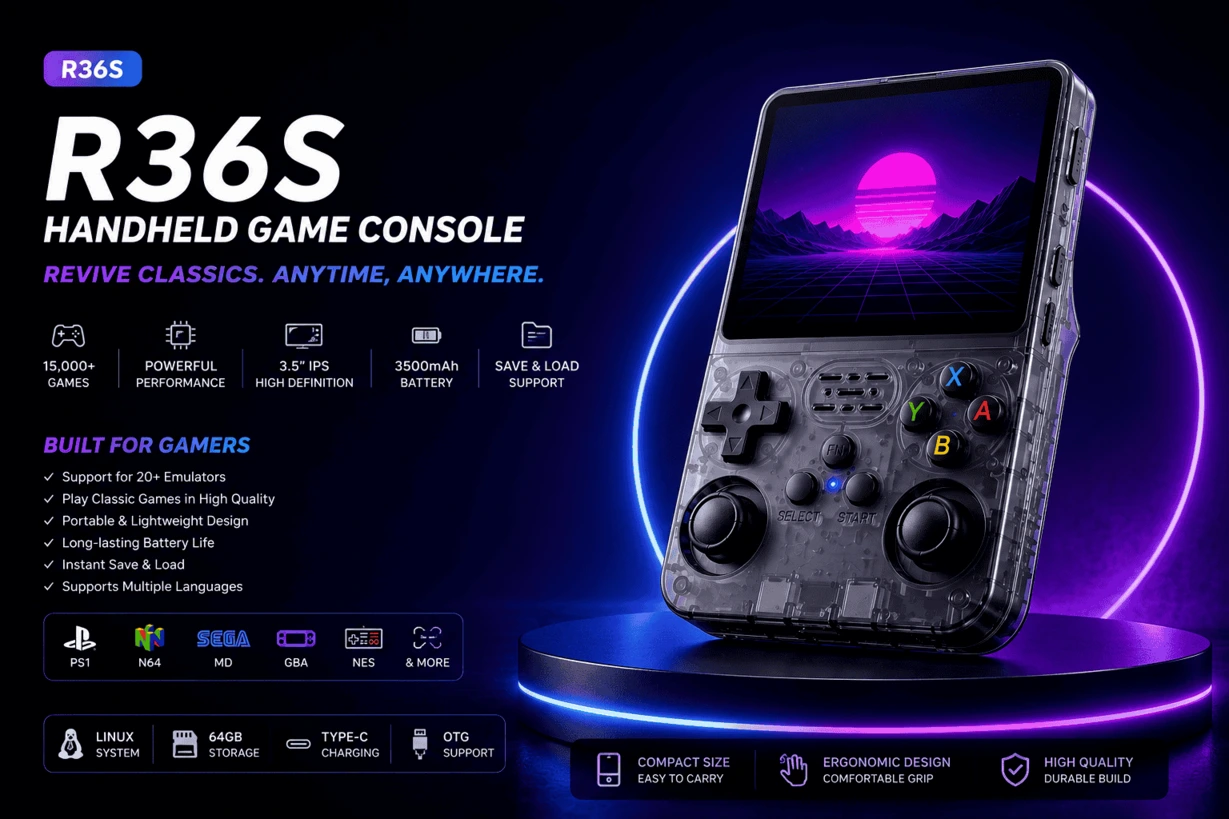
TL;DR – What’s Actually on the R36S
Let’s get the obvious question out of the way: when you see “15,000+ games preloaded,” your first instinct is probably skepticism. That number sounds like marketing fluff — and on many cheap handhelds, it is. The R36S is different. The count is real, and it adds up fast once you factor in multiple regional versions of games (USA, Europe, Japan) alongside thousands of arcade ROMs.
What you’re really getting is a pocket-sized museum of gaming history. Every era from 8-bit NES through to PSP, running on a 3.5-inch IPS screen that does genuine justice to each generation. The one-paragraph version:
The R36S plays games from NES, SNES, N64, Game Boy, GBA, Nintendo DS, Sega Master System, Sega Genesis, Sega Saturn, Dreamcast, PS1, PSP, Neo Geo, CPS1/CPS2 arcade, MAME, PC Engine, and more — 20+ systems in a single device that fits in your jacket pocket.
If you want the full breakdown — what runs well, what runs rough, and which games are actually worth loading up — read on.
Nintendo Systems
Nintendo’s back catalog is the backbone of the R36S experience. Every major Nintendo platform up through the DS is represented here, and most of them run near-perfectly out of the box.
NES (Nintendo Entertainment System)
8-bit classics run flawlessly. The FCEUX core inside RetroArch handles the entire NES library without breaking a sweat. Super Mario Bros. 1, 2, and 3, The Legend of Zelda, Metroid, Contra, Castlevania, Mega Man 2 and 3 — all present, all smooth. The R36S IPS screen actually makes these games look sharper than they did on old CRT televisions.
SNES (Super Nintendo)
The 16-bit era is where things really open up. Snes9x runs the entire SNES library on the R36S without slowdown. You’ve got the essentials: Super Mario World, A Link to the Past, Chrono Trigger, Super Metroid, Donkey Kong Country 1–3, Final Fantasy VI, EarthBound, Street Fighter II Turbo. This is arguably the sweetest spot in the entire R36S game library. The screen size is close to perfect for 16-bit sprites.
Nintendo 64
N64 is where things get more nuanced. Many games run well — Super Mario 64, Ocarina of Time, Mario Kart 64, Star Fox 64, Banjo-Kazooie are all solid. But N64 emulation is demanding, and some later titles will show slowdown or graphical glitches. It’s not a dealbreaker, but worth knowing. The dual analog sticks on the R36S are essential here — a big advantage over vertical-form handhelds that lack them.
Game Boy, Game Boy Color & Game Boy Advance
All three generations run perfectly. GBA is a genuine highlight — the R36S screen size and resolution were practically made for Game Boy Advance games. Pokémon FireRed, Emerald, and Ruby; the Castlevania GBA trilogy; Metroid Fusion; Golden Sun; Final Fantasy Tactics Advance; Advance Wars. The GBA library is enormous and the R36S handles every bit of it without complaint.
Nintendo DS
DS emulation works via DraStic and handles most of the library well. The dual-screen layout renders both screens stacked vertically on the R36S — it takes ten minutes to adjust to and then feels completely natural. Pokémon HeartGold and SoulSilver, Mario Kart DS, New Super Mario Bros., Professor Layton — all very playable.
Sega Systems
Sega fans are extremely well served here. The Genesis emulation in particular is as clean as you’ll find on any handheld at any price.
Sega Master System
8-bit Sega runs perfectly. Alex Kidd in Miracle World, Phantasy Star, Wonder Boy III, Sonic the Hedgehog (the Master System version), OutRun — all present, all smooth. It’s a bonus system that often gets overlooked but has a genuinely great library.
Sega Genesis / Mega Drive
Genesis emulation on the R36S is exceptional. Genesis Plus GX is one of the most optimized emulator cores in existence, and it shows. Sonic 1, 2, and 3 & Knuckles, Streets of Rage 1–3, Gunstar Heroes, Mortal Kombat, NBA Jam, Castlevania: Bloodlines, Comix Zone — the Genesis library is rich and every title plays exactly as it should.
Sega Saturn
Saturn is the one genuinely patchy area. The Saturn’s unusual hardware architecture makes it notoriously difficult to emulate even on powerful modern hardware. Some 2D titles run reasonably; most 3D games struggle. Treat it as a bonus rather than a core feature.
Dreamcast
Dreamcast is a genuine surprise. The R36S handles Dreamcast emulation far better than its price point suggests. Marvel vs. Capcom 2, Sonic Adventure, Soul Calibur, Crazy Taxi, Power Stone 2 — all playable. Some demanding 3D titles show frame drops, but for a device in this price range to run Dreamcast at all is genuinely impressive.
Sony Systems
PlayStation 1
PS1 emulation is one of the R36S’s standout strengths. Final Fantasy VII, VIII, and IX run beautifully. Metal Gear Solid, Crash Bandicoot 1–3, Spyro 1–3, Resident Evil 1–3, Symphony of the Night, Tekken 3, Gran Turismo — the PS1 library is enormous and the R36S handles the vast majority without issues. One practical tip: disable rewind and fast-forward in RetroArch when playing PS1 games, as they cause slowdown even on otherwise smooth titles.
PSP (PlayStation Portable)
PSP is the most demanding system the R36S takes on, and it handles it better than most buyers expect. God of War: Chains of Olympus, Crisis Core: Final Fantasy VII, Persona 3 Portable, Monster Hunter Freedom Unite, Tekken: Dark Resurrection — these all run well. Some visually intense PSP titles will drop frames, but overall PSP emulation here punches well above the hardware’s price class.
Arcade Emulators
The arcade selection is where the R36S quietly shines for a lot of people. If you spent quarters at the local arcade in the late ’80s and ’90s, this part of the library is going to hit differently.
CPS1 & CPS2 (Capcom)
Capcom’s legendary arcade boards are fully represented. CPS1 brings you Street Fighter II, Final Fight, and Ghouls ‘n Ghosts. CPS2 is where things really get good — Super Street Fighter II Turbo, Marvel vs. Capcom, X-Men vs. Street Fighter, Alien vs. Predator, Dungeons & Dragons: Tower of Doom. These games were built to be played at exactly the pace the R36S runs them.
Neo Geo
SNK’s arcade powerhouse is fully emulated. Metal Slug 1–5, King of Fighters ’98, ’99, and 2002, Garou: Mark of the Wolves, Samurai Shodown 1 and 2 — all running at full speed. For fighting game and run-and-gun fans, the Neo Geo library alone justifies the purchase.
MAME
MAME compatibility opens up the broader arcade universe beyond Capcom and SNK. Pac-Man, Galaga, Dig Dug, Donkey Kong, Street Fighter Alpha — decades of arcade history, all in your pocket.
Full Emulator Compatibility Table
Here’s how every major system stacks up on the R36S, based on real testing across the library:
| System | Era | Performance | Notable Titles |
|---|---|---|---|
| NES Great | 8-bit | ★★★★★ | Mario, Zelda, Contra, Mega Man |
| SNES Great | 16-bit | ★★★★★ | Chrono Trigger, Super Metroid, FFVI |
| N64 Good* | 3D era | ★★★☆☆ | Mario 64, Ocarina, GoldenEye |
| Game Boy / GBC Great | Handheld | ★★★★★ | Pokémon Red/Blue/Gold, Tetris |
| GBA Great | Handheld | ★★★★★ | Pokémon, Castlevania, Golden Sun |
| Nintendo DS Good | Handheld | ★★★☆☆ | Pokémon HeartGold, Mario Kart DS |
| Sega Master System Great | 8-bit | ★★★★★ | Alex Kidd, Phantasy Star |
| Sega Genesis Great | 16-bit | ★★★★★ | Sonic, Streets of Rage, Gunstar Heroes |
| Sega Saturn Varies | 32-bit | ★★☆☆☆ | 2D games mostly OK; 3D rough |
| Dreamcast Good | 6th gen | ★★★☆☆ | MvC2, Crazy Taxi, Soul Calibur |
| PlayStation 1 Great | 3D era | ★★★★★ | FF7, Metal Gear Solid, Crash, Spyro |
| PSP Good | Handheld | ★★★☆☆ | God of War, Crisis Core, Persona 3 |
| Neo Geo Great | Arcade | ★★★★★ | Metal Slug, KOF, Garou |
| CPS1 / CPS2 Great | Arcade | ★★★★★ | Street Fighter II, Marvel vs. Capcom |
| MAME Good | Arcade | ★★★☆☆ | Pac-Man, Galaga, Donkey Kong |
| PC Engine Great | 16-bit | ★★★★★ | Castlevania: Rondo of Blood |
* N64 performance varies by title. Classics run well; some demanding later games may stutter.
Must-Play Games Per System
Staring at 15,000 games wondering where to start is a real problem. Here’s a shortlist of titles that genuinely shine on the R36S’s 3.5-inch IPS screen and hold up on this hardware:
Use the R36S built-in Save State feature anywhere in any game. Press Select + R1 to save your state instantly, Select + L1 to load it. This is a lifesaver for longer RPG sessions or any older game without a password system.
How to Add Your Own Games
The 15,000 preloaded titles are a strong start, but the R36S was built to grow with you. Adding your own game files is genuinely straightforward:
- Grab a MicroSD card. The included card works fine, but upgrading to a larger one gives you room to expand.
- Open the ROMs folder on your computer. You’ll find subfolders for every system — NES, SNES, PSP, GBA, PS1, and so on.
- Drop your game files (.nes, .sfc, .gba, .iso, .cso, etc.) into the matching system folder.
- Eject the card, reinsert it into the R36S, and launch ArkOS. Your new games appear in the menu automatically.
Before anything else, back up the stock MicroSD card to your computer. If something ever goes wrong with the card, you’ll want that image to restore from. Takes about ten minutes and saves enormous headaches later.
Final Verdict: Is the Game Library Worth It?
Here’s the honest take on the R36S game library: you’re not buying a device padded out with 15,000 forgotten shovelware titles. You’re getting a genuine sweep across the greatest gaming eras in history — the 8-bit and 16-bit golden age, the PlayStation revolution, the handheld boom of GBA and DS, and the arcade scene that defined a generation.
The systems that matter most — SNES, PS1, GBA, Neo Geo, Genesis — all run exceptionally well. N64 and PSP punch above the device’s weight. Dreamcast shows up and does more than it has any right to at this price. The only real weak spot is Sega Saturn, which is a known challenge for emulation even on far more expensive hardware.
For retro gaming, the R36S offers something rare: a complete all-in-one library of gaming history that fits in a jacket pocket. Whether you’re revisiting childhood favorites or exploring classics you missed first time around, this is the game list that covers all of it.